Redmine Checklist – structured steps inside every issue.
For QA leads and engineering leads who need enforced completion criteria in Redmine.
Partial delivery marked done is a delivery risk no one sees coming.
Without a structured definition of done inside each issue, work marked done under deadline pressure leaves QA steps unverified and deployment steps unenforced. There is no structural visibility into which sub-steps are complete and which are still outstanding. Inconsistent “done” criteria across team members makes sprint reviews longer and release confidence lower.
Every step visible. Every closure enforced.
The Checklist Plugin works as a structured completion layer at the issue level. Every step is explicit. Every closure is verified. Teams that previously relied on informal review processes to catch incomplete work replace that overhead with structural enforcement that operates automatically at the issue level.
Redmine, upgraded for delivery discipline.
What is the Redmineflux Checklist Plugin?
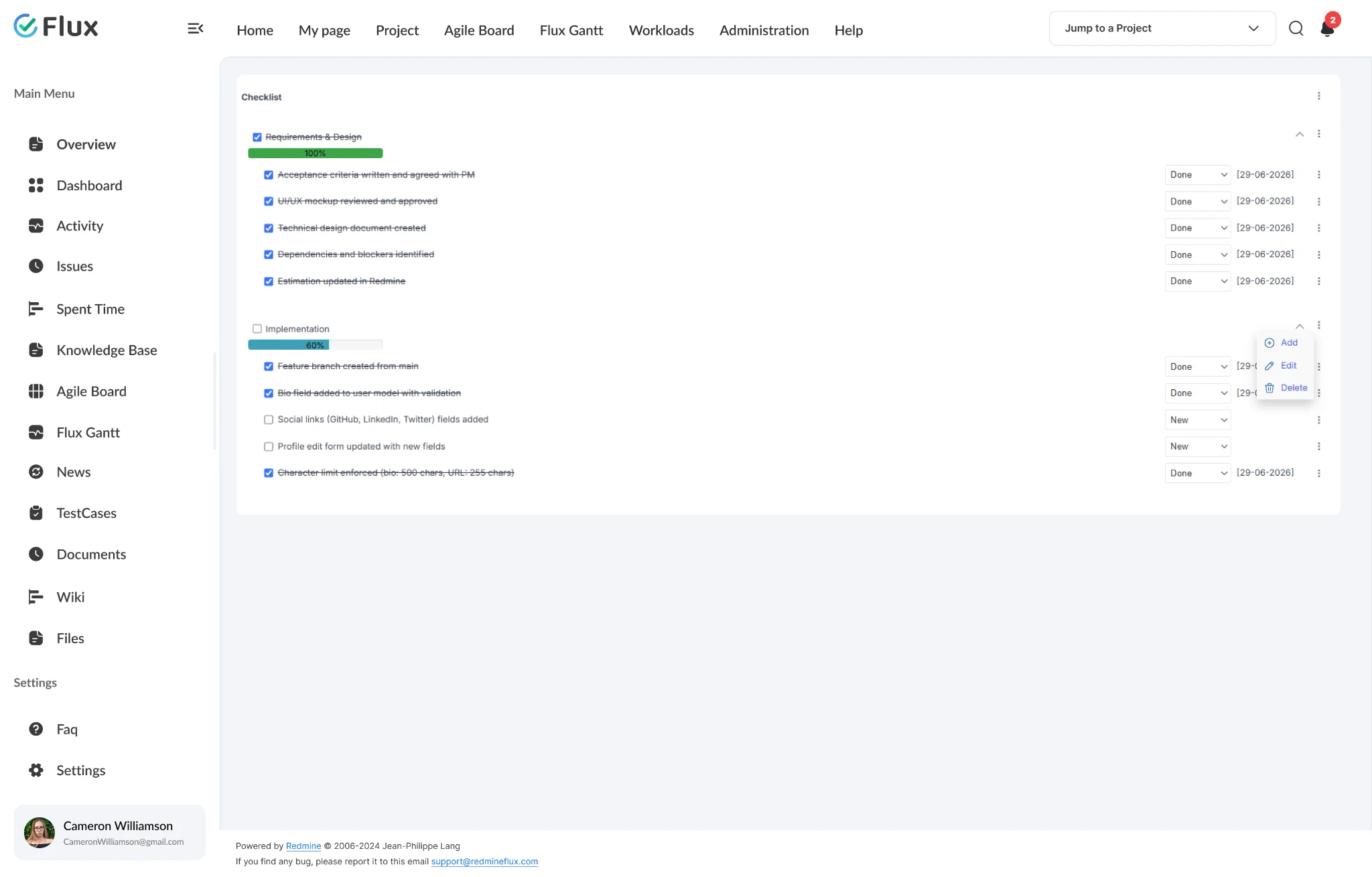
The Redmineflux Checklist Plugin adds configurable checklists directly inside Redmine issues. Each checklist contains discrete steps that must be checked off before the issue can be closed. Teams can define reusable checklist templates, track progress with visual indicators, and enforce issue closing until all steps are complete.
Completion you can see, not assume.
Pick a shift to see what changes in the product. They play on their own – hover to pause.
Issues cannot close until all required steps are complete.
Structural enforcement means completion standards apply consistently without project managers manually reviewing every issue before status changes are permitted. The tool enforces the rule automatically.
QA steps enforced structurally, not by convention.
Review and testing steps defined as mandatory checklist items cannot be skipped. QA leads who previously discovered that testing steps were bypassed after closure now have a structural mechanism that prevents closure before testing is confirmed.
One completion standard, applied across every team member.
Every engineer, QA analyst, and project contributor works to the same completion standard. Convention-dependent processes – where some team members follow the standard and others do not – are replaced by structural enforcement that applies uniformly.
Outstanding steps visible to the whole team in real time.
Completion progress is visible on the issue page without reading through comments or status history. Managers can see checklist completion status directly on the issue page without reading through comments or status history.
Review cycles faster through visible completion state.
Reviewers and QA leads can assess issue readiness from the list view before opening individual issues. This reduces the time spent in review on issues that are not yet ready for inspection.
The specifics, for people who want them.
Add discrete, trackable steps to any Redmine issue.
- Multiple checklists per issue, each with its own list of items
- Item statuses: New, In Progress, and Done for granular step tracking
- Title and description text fields for each checklist item
- Progress indicator shows how many steps remain at a glance
Prevent partial closure with structural controls.
- Global setting blocks issue closing until all checklist items are ticked
- Configured once in Admin > Plugins > Checklist > General tab
- Visual progress indicator on the issue page
- Checklist items remain visible on the issue for full team transparency
Build standard checklists once, apply them consistently.
- Save checklist templates and apply with a single action
- Templates configured at admin level and linked to a specific tracker
- Apply a template to any issue with a single action
- Managed in Admin > Plugins > Checklist > Templates tab
See completion state at a glance inside every issue.
- Items support New, In Progress, and Done statuses
- Visual progress bar shows how many steps are complete at a glance
- Simple checkbox mode also available per item
- Multiple checklists per issue for distinct task groups
Control who can create, edit, and complete checklist items.
- Role-based permissions for creation vs. completion
- Read-only access for stakeholders and observers
- Per-project permission configuration
- Permissions follow your existing Redmine role configuration
What Checklist changes for each role.
Project Manager
Consistent closure criteria across all tasks, projects, and delivery cycles – without manually reviewing every issue before a status change is permitted.
QA Lead
QA and testing steps enforced structurally before any issue reaches closed status – eliminating the post-closure discovery of bypassed testing steps.
Engineering Lead
Structured review, code check, and deployment checklists embedded in every issue – so the process is the same regardless of who is closing the ticket.
IT Director
Governance over delivery standards with consistent closure enforcement – no step bypassed, no partial delivery marked done across any issue in any project.
Checklist gets better with these.
Three ways to get Checklist.
Checklist – self-hosted
- 1 year of support included
- Renew support at 30% per year
- No licence keys · unlimited users · full source
Pick the plugins you need
Add Checklist and the plugins it works with on the pricing page – see your one-time total, renewal and 3-year cost.
Build the stack →Redmineflux Cloud
- Checklist and every other plugin included
- Fixed price per team size – never per user
- Hosted, backed up and updated by us
Questions teams ask before adopting Checklist.
If yours isn’t here, check the pricing page or write to support@redmineflux.com.
Can checklist items be required before an issue can be closed?+
Yes. When the Block issue closing option is enabled, an issue cannot be set to a closed status until all checklist items are ticked. This is a global setting configured in Admin > Plugins > Checklist > General tab. It applies across the installation and does not require per-tracker or per-project setup.
Can I reuse checklists across multiple issues?+
Yes. Checklist templates can be configured and applied to new issues. Templates are created in Admin > Plugins > Checklist and linked to a tracker, giving teams a consistent starting checklist for each issue type.
What progress statuses do checklist items support?+
Checklist items can be set to New, In Progress, or Done. A visual progress bar on the issue shows how many items are complete at a glance. Items can also be tracked with a simple checkbox. Multiple checklists are supported per issue for distinct task groups.
Which Redmine versions are supported?+
The Redmineflux Checklist Plugin supports all Redmine versions. Compatibility is verified with each plugin update.
How much does the Checklist Plugin cost?+
Checklist is $49 one-time for self-hosted Redmine – 1 year of support included, then support renews at 30% of the plugin price per year. Or get every plugin hosted on Redmineflux Cloud from $69/month for up to 25 users – a fixed price, never per user.
Is there a free demo available?+
Yes – request a free demo and we’ll send a personalised demo link straight to your inbox. No credit card required, no commitment. Explore the real product at full capacity, at your own pace.
Every Redmineflux plugin
Checklist running inside your Redmine.
$49 one-time on self-hosted Redmine – or every plugin on Cloud from $69/month.