Redmine Test Case Management – QA built inside Redmine.
For QA leads and engineering teams running release cycles on Redmine – test suites, run tracking, requirements traceability, and report types without a second tool.
QA lives in a spreadsheet that doesn’t know about your Redmine issues.
Test cases accumulate in spreadsheets that don’t update when requirements change. Testers log results in one place while defects land in Redmine – so traceability requires manual reconciliation before every release review. Milestones slip because nobody can see how many runs are still open without counting them by hand. The team switches between Redmine and a second QA tool, producing two sources of truth that drift apart at the worst possible moment.
One workspace. Not two.
Every test case is a Redmine issue. Every defect raised from a run lands in the Redmine issue tracker. Every requirement links to test cases and to defect closure. The QA lead, the developer, and the delivery head are looking at the same data – no export, no reconciliation, no “which system is right” conversation before release.
Run states — New, In Progress, Done — are set per run and visible to everyone on the project. The release manager sees exactly how many runs are open without chasing updates in Slack or counting rows in a spreadsheet.
What is the Redmineflux Test Case Management Plugin?
The Redmineflux Test Case Management Plugin extends Redmine so test planning and execution happen inside the same workspace as issue tracking. Test cases are Redmine issues. Suites organise them into hierarchical folders. Runs assign cases to team members and track states from New to Done. Requirements, defects, and results all link to the same Redmine project – nothing lives in a separate system.
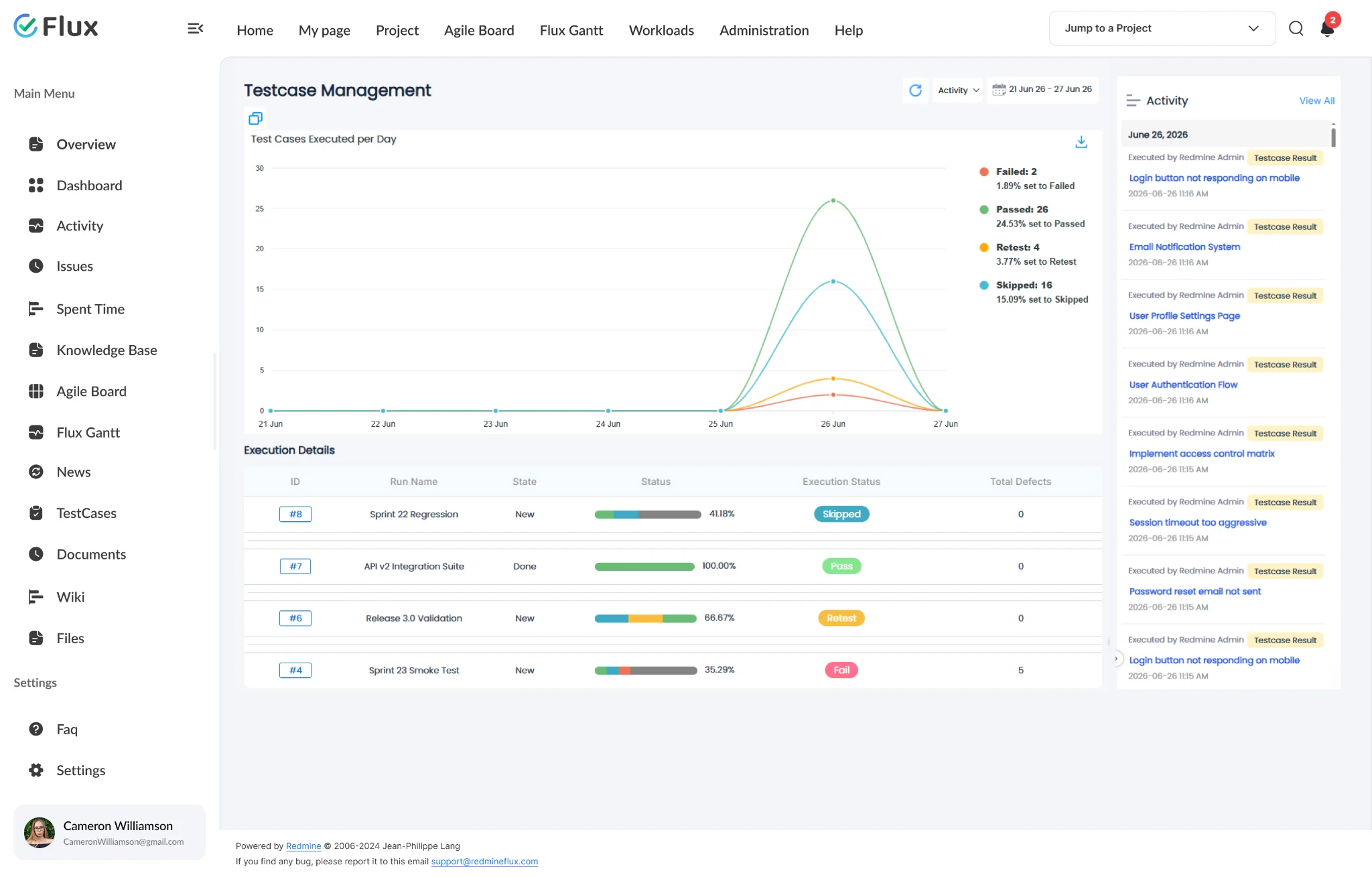
Test coverage an auditor can actually trace.
Pick a shift to see what changes in the product. They play on their own – hover to pause.
Test cases that live where defects live.
Test cases are Redmine issues attached to a configurable tracker. A defect raised from a failed run is also a Redmine issue – linked directly to the result record. Developers investigating escalations see the full context without switching systems.
Every tester knows exactly what to do next.
Runs assign cases to specific team members. Each tester sees their personal to-do list of assigned runs, filtered to their name. States (New · In Progress · Done) make progress unambiguous — no more “what’s your status?” in Slack.
Defects raised without leaving the run.
When a test case is marked Failed or Blocked, a Report Bug button creates a Redmine defect directly linked to that result record. The defect links directly to the failed test case and test run. The tester can attach files, add notes, or relate an existing defect — all without leaving the run.
Reports that generate themselves.
Six report types — testcase summary, defect summary, activity, tester scorecard, requirement coverage, overdue runs — export to PDF or HTML. Scheduled generation via Sidekiq means the QA manager’s weekly report is ready before they ask for it.
Traceability an auditor can follow.
Requirements are rich-text documents linked directly to test cases. The requirements traceability matrix (RTM) shows each requirement, the test cases covering it, and any defects raised. Auditors get a complete chain from requirement through test execution to defect closure — all inside Redmine.
The specifics, for teams that want them.
Hierarchical suites and structured cases.
- Nested suite folders with sub-folder support — via TestSuite parent_id
- Test cases as Redmine issues on a configurable tracker
- Test steps with expected results per case –Step model
- Bulk CSV import via 4-step wizard with field mapping
- Drag-and-drop case assignment into suites
Assigned runs, tracked states, multi-environment execution.
- Personal to-do list per tester – RunAssignment model
- States: New · In Progress · Done — set per run
- Execution statuses: Untested / Passed / Failed / Retest / Blocked / Skipped — IssueStatusResult
- Close run to archive completed execution cycles
- Overdue run email reminders — configurable frequency
Six reports, scheduled generation, and a full RTM.
- Six report types: testcase summary, defect summary, activity, tester scorecard, requirement coverage, overdue runs
- PDF and HTML export for every report type
- Scheduled report generation – ScheduledReport model, Sidekiq
- Requirements as rich-text documents linked to test cases — Requirement model
- Traceability matrix (RTM): requirement → test case → defect
What Test Case Management changes for each role.
QA Lead
Test libraries stay organised in suites. Every tester has a clear to-do list. Reports generate without manual assembly the night before a release.
Engineering Lead
Defects from test runs link directly to Redmine issues. Developers investigating escalations see the full test context without switching systems.
Delivery Head
Overdue-run reports surface blockers before the release date arrives, not on the day. Run states — New, In Progress, Done — show exactly where every cycle stands without chasing updates.
CTO / IT Director
Requirements traceability matrix gives auditors a verifiable chain from requirement through test execution to defect closure — all inside Redmine.
Test Case Management gets better with these.
Three ways to get Test Case Management.
Test Case Management – self-hosted
- 1 year of support included
- Renew support at 30% per year
- No licence keys · unlimited users · full source
Pick the plugins you need
Add Test Case Management and the plugins it works with on the pricing page – see your one-time total, renewal and 3-year cost.
Build the stack →Redmineflux Cloud
- Test Case Management and every other plugin included
- Fixed price per team size – never per user
- Hosted, backed up and updated by us
Questions teams ask before adopting Test Case Management.
If yours isn’t here, check the pricing page or write to support@redmineflux.com.
Can test cases coexist with our existing Redmine issues?+
Yes. Test cases are Redmine issues attached to a configurable tracker – your development issues are untouched. The test case tracker is enabled per project, so only the projects that need QA tracking have the module active. Existing issue history and custom fields are unaffected.
How does the bulk CSV import work?+
A four-step wizard handles file upload, column mapping, preview, and import confirmation. Field mapping is configurable, so existing spreadsheet column names do not need to change before import. Validation errors surface in the preview step before any data is written.
What happens when a tester records a defect?+
A defect is a Redmine issue. The tester creates it from the run result page; the plugin links the defect issue ID to the result record. The defect appears in the issue tracker alongside all other project issues – no separate bug database, no export step.
What statuses are available when executing test cases?+
Six statuses are available: Untested, Passed, Failed, Retest, Blocked, and Skipped. When a result is set to Failed or Blocked, the plugin shows a Report Bug button — the tester creates a Redmine defect directly linked to that result record. No separate bug database, no copying issue numbers between tabs.
How much does the Test Case Management Plugin cost?+
Test Case Management is $499 one-time for self-hosted Redmine – 1 year of support included, then support renews at 30% of the plugin price per year. Or get every plugin hosted on Redmineflux Cloud from $69/month for up to 25 users – a fixed price, never per user.
Is there a free demo available?+
Yes – request a free demo and we’ll send a personalised demo link straight to your inbox. No credit card required, no commitment. Explore the real product at full capacity, at your own pace.
Test Case Management running inside your Redmine.
$499 one-time on self-hosted Redmine – or every plugin on Cloud from $69/month.