Redmine Invoice – generate client invoices from time logs.
For finance leads, project managers, and IT directors billing clients from Redmine – without rebuilding data in a separate billing tool.
Time is in Redmine. Invoices are somewhere else. That gap costs money.
Most Redmine teams already capture time against issues and projects. But invoicing still happens somewhere else – in spreadsheets, accounting software, or email. Hours logged in Redmine are manually transferred to another tool, which leads to missed or miscounted entries, especially near period close. Billing rates are applied inconsistently because there is no enforced rule by project or team member. Compiling invoice data manually takes days, which delays invoice delivery beyond agreed payment terms and slows revenue collection. When clients dispute billed hours, there is often no direct link between the invoice line item and the original Redmine time entry needed to resolve the dispute.
Invoices that reflect actual work, not estimates.
The Invoice Plugin closes the gap between time tracking and client billing. Generate invoices directly from Redmine time log entries, within the same workspace your team uses to plan and track work. No exports, no manual reconstruction, no second system to maintain.
Each invoice is built from actual time entries, filtered by date range and billable activity, and applied against project-specific or user-specific billing rates you configure. The result is a clear, traceable connection between logged hours and the billed amount.
Every plugin in Cloud also runs on self-hosted Redmine.
What is the Redmineflux Invoice Plugin?
The Redmineflux Invoice Plugin is a Redmine billing plugin that generates client invoices directly from logged time entries. It supports configurable billing rates per project or per user, a Draft → Sent → Paid invoice workflow, Stripe payment integration, customer management, and a central invoice dashboard – all inside Redmine. Compatible with all Redmine versions.
Specific shifts, not vague benefits.
Pick a shift to see what changes in the product. They play on their own – hover to pause.
Full visibility into billable hours before an invoice is sent.
Review exactly what is being billed – by activity, by team member, by date – before dispatching to the client. Draft invoices are fully editable. Adjustments happen inside Redmine, not in a spreadsheet reconstruction.
Every invoice line item traces back to a Redmine time entry.
Invoices reflect actual work, not estimates. Every line item links back to a logged Redmine time entry with a date, user, and activity. Disputes are resolved against a verifiable record – not a spreadsheet no one can now locate.
Generate, review, and send invoices without leaving Redmine.
Generate, review, and send invoices directly from Redmine. Stripe integration supports online payment links so clients can pay from the invoice email. Faster invoice-to-payment cycles – because the process doesn’t leave the project workspace.
Billing rules configured once, applied consistently across every cycle.
Set project hourly rates, define billable activities, and configure per-user team rates in one place. The plugin applies those rules automatically when invoices are generated. No more inconsistent billing from manually applied rates.
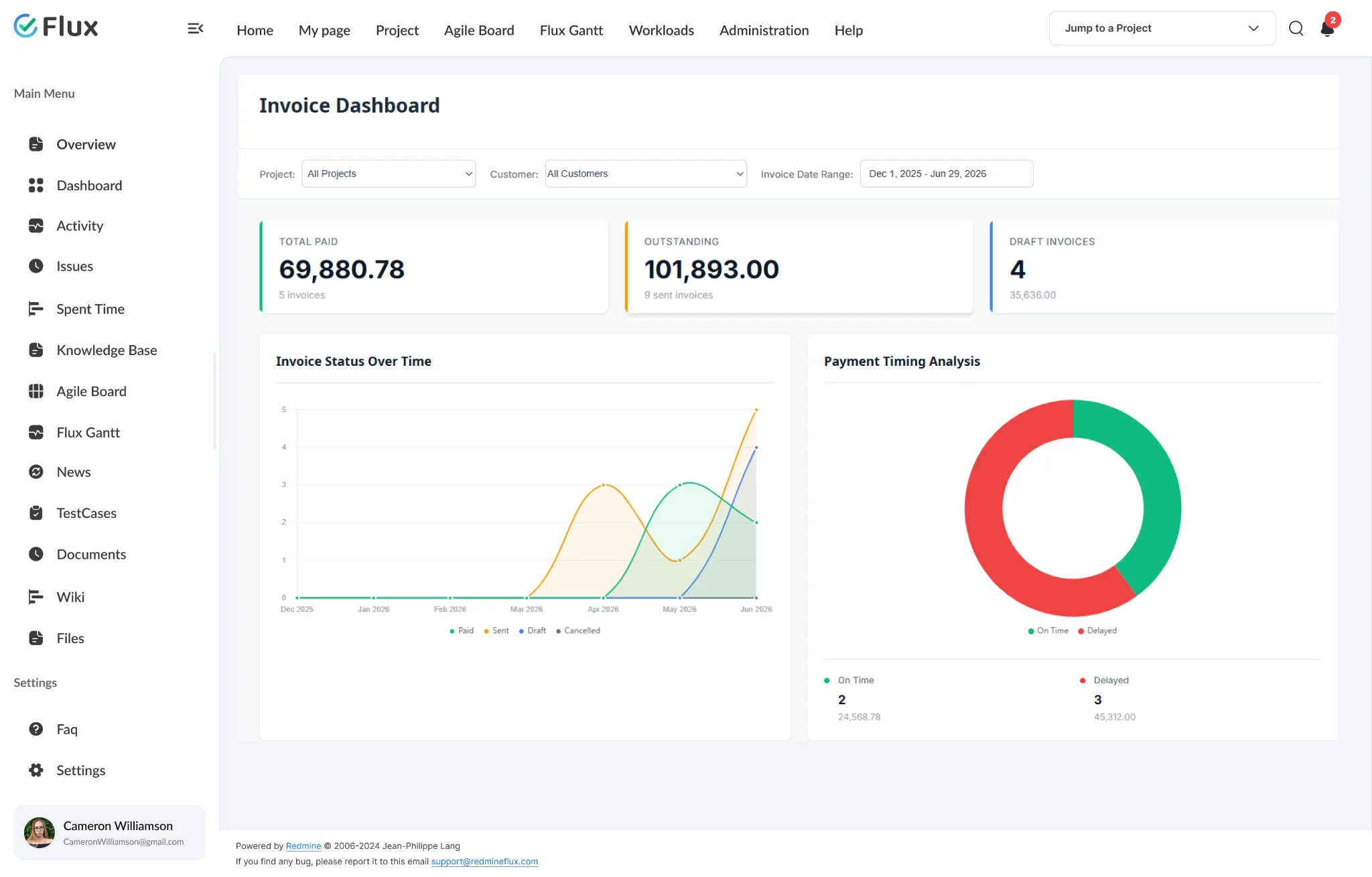
Complete billing status visible across all projects from one dashboard.
View all invoices across every project – paid, sent, and unpaid – from a single dashboard. Track outstanding revenue and payment status without navigating project by project. Finance leads and business owners see the full billing picture in one place.
The specifics, for people who want them.
Built from real Redmine time entries, not reconstructed from memory.
- Select project, date range, and billable activities – plugin builds the rest
- Project hourly rates applied uniformly; per-user Team Rates override per member
- Draft → Sent → Paid status path with locked editing after dispatch
- Custom invoice and email templates with branded layout
- Entire billing workflow stays inside Redmine from first draft to payment
Central client records across all invoice-generating projects.
- Global customer module accessible across all projects
- Contact details, billing address, and invoice history per client
- Link each project to its customer – invoices always associated correctly
- One consistent client record across all invoice-generating projects
- Payment terms and branding configured once, applied to all invoices
Online payment directly from the invoice email.
- Configure Stripe credentials in payment gateway settings
- Payment link generated inside every dispatched invoice
- Clients pay directly from the invoice email – no extra setup
- Manual payment recording gives finance control over reconciliation
- Invoice dashboard tracks paid, sent, and unpaid status across all projects
What Invoice changes for each role.
Finance Lead
Invoices built from verified Redmine time data – no spreadsheet reconstruction, no manually applied rates, no period-close panic.
Project Manager
Billing accuracy improves because every invoice line item is traceable to a logged time entry. Disputes are resolved against a verifiable record, not a memory.
IT Director
One system of record for project work and client invoicing – with a full audit trail, inside the Redmine environment your team already governs.
Business Owner
Outstanding, sent, and paid invoices visible from a single dashboard across all active client engagements – without navigating project by project.
Invoice gets better with these.
Three ways to get Invoice.
Invoice – self-hosted
- 1 year of support included
- Renew support at 30% per year
- No licence keys · unlimited users · full source
Pick the plugins you need
Add Invoice and the plugins it works with on the pricing page – see your one-time total, renewal and 3-year cost.
Build the stack →Redmineflux Cloud
- Invoice and every other plugin included
- Fixed price per team size – never per user
- Hosted, backed up and updated by us
Questions teams ask before adopting Invoice.
If yours isn’t here, check the pricing page or write to support@redmineflux.com.
Which Redmine versions does the Invoice Plugin support?+
The Invoice Plugin supports all Redmine versions. Compatibility is tested and maintained with each plugin update.
How are invoices generated from Redmine time entries?+
Go to Project → Invoice Tab, open Invoice Settings, select a date range, and click Save. The plugin reads all matching Redmine time entries within that range and builds the invoice automatically based on your configured billing rates and activities. No manual data entry required.
Can I set different billing rates for different team members on the same project?+
Yes. The plugin supports a Team Rate configuration at the project level. Assign a specific hourly rate to individual users within each project.
Can I edit an invoice after it has been sent?+
No. Invoices are only editable in Draft status. Once you click Send Email and the invoice status changes to Sent, it becomes non-editable. Review and adjust all line items, rates, and date ranges before dispatch.
Can clients pay invoices online?+
Yes. Configure Stripe credentials (Publishable Key and Secret Key from your Stripe Dashboard) in the payment gateway settings. The plugin generates a payment link in every dispatched invoice email. Clients pay directly without additional setup on their end.
Does Invoice Plugin use Redmine’s existing roles and permissions?+
Yes. Enable the invoice module per project through Redmine’s standard module settings. Billing configuration and customer assignment follow your existing Redmine project permissions – no separate access system is needed.
What is the licensing model?+
One-time purchase with 1 year of support included. Support renewal after 1 year 30% of plugin price. Price: $199.
How much does the Invoice Plugin cost?+
Invoice is $199 one-time for self-hosted Redmine – 1 year of support included, then support renews at 30% of the plugin price per year. Or get every plugin hosted on Redmineflux Cloud from $69/month for up to 25 users – a fixed price, never per user.
Is there a free demo available?+
Yes – request a free demo and we’ll send a personalised demo link straight to your inbox. No credit card required, no commitment. Explore the real product at full capacity, at your own pace.
Every Redmineflux plugin
Invoice running inside your Redmine.
$199 one-time on self-hosted Redmine – or every plugin on Cloud from $69/month.