Lotus Theme — A Structured, Customizable Interface for Redmine.
Replaces Redmine's default layout with a collapsible sidebar, colour-coded tracker borders, custom priority icons, and a rich project card view — for teams that need visual structure, not just visual polish.
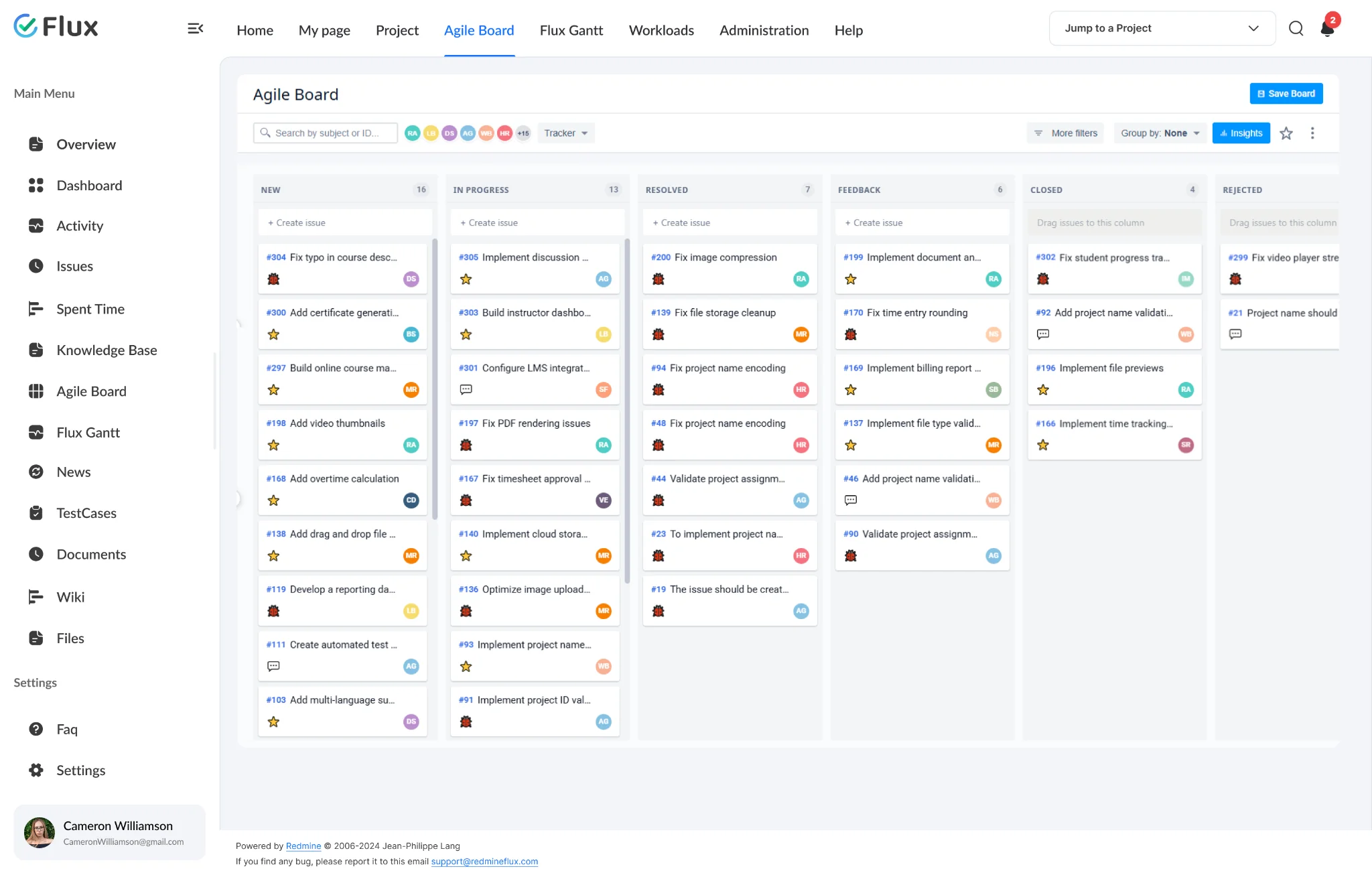
Lotus across your workflow.
Pick a view to see what Lotus changes. They play on their own – hover to pause.
Issue list – tracker types at a glance
Colour-coded left borders on issue ID cells make Bug, Feature, Enhancement, and Support issues instantly distinguishable across issue lists, related issues, and subtask tables. Your team scans the list rather than reading each tracker column individually.
Collapsible sidebar – more space when you need it
The left sidebar collapses in one click and saves its state across browser sessions. On a laptop with a Gantt chart or wide issue list open, it gives back real working space. Tooltips keep labels visible when the sidebar is collapsed — nothing is lost.
Projects index – status without clicking
Switch between a rich Grid view and a traditional List view on the Projects index. Cards surface customer name, project manager, progress bar, team member avatars, dates, and subproject hierarchy — everything a project manager needs before opening any project.
Three themes. Pick by how your team works.
| Theme | Best for | Included with | Link |
|---|---|---|---|
| DaisyLight | Teams of 10–300 who want a clean, light, minimal interface – popular with agile teams. | Included with any Bundle | See Daisy → |
| ScarletDark | Teams who work in Redmine five-plus hours a day and want a dark, low-glare interface. | Included with any Bundle | See Scarlet → |
| LotusConfigurable | Large installs that need visual structure: collapsible sidebar, colour-coded trackers, rich project cards. | Included with All Plugins Bundle | This page |
All three work on every Redmine version, with every Redmineflux plugin, and are pre-installed on Redmineflux Cloud. Users can pick their own theme where Redmine allows it.
Three ways to get Lotus.
Lotus – self-hosted
Install Lotus on your existing Redmine instance. Tracker border colours and priority icons are configured from the Redmine admin panel once installed — no dependency on any other Redmineflux plugin required.
- 1 year of updates included
- Renew at 30% per year
- No plugin dependency
Included with All Plugins Bundle
Lotus ships inside the bundle – no separate theme licence. Bundles save 5–10% on the plugins too.
See Bundle pricing →Redmineflux Cloud
- All three themes pre-installed
- Every plugin included – never per user
- Hosted, backed up and updated by us
Questions teams ask before switching to Lotus.
Works on all Redmine versions · WCAG 2.1 AA contrast · install: copy to public/themes and switch from the admin panel.
Does the Lotus Theme require database changes?+
No. The Lotus Theme stores all settings — tracker border colours and priority icons — using Redmine's built-in plugin settings system. No database tables are created or modified. The standard plugin migration command is run as a registration step only.
Is the Lotus Theme compatible with Redmineflux plugins?+
Yes. Lotus is designed and tested to work alongside all Redmineflux plugins — including Dashboard, Agile Board, Workload, Timesheet, and Helpdesk. The theme repositions Timesheet and Helpdesk sidebar content automatically for consistent layout integration.
How do I activate the Lotus Theme after installation?+
Navigate to Administration → Settings → Display, select “Redmineflux Lotus” from the Theme dropdown, and click Save. The layout applies across all Redmine pages immediately — no server restart required. Tracker colours and priority icons are then configurable from Administration → Plugins → Configure.
Which Redmine versions is the Lotus Theme compatible with?+
The Redmineflux Lotus Theme is compatible with all Redmine versions. Compatibility is verified with each theme update.
Lotus on your Redmine, in minutes.
$99 one-time · included with all plugins bundle · pre-installed on Cloud.