Redmine Time Tracker – log time the way developers actually work.
For developers and engineering leads who need accurate Redmine time data without the logging overhead.
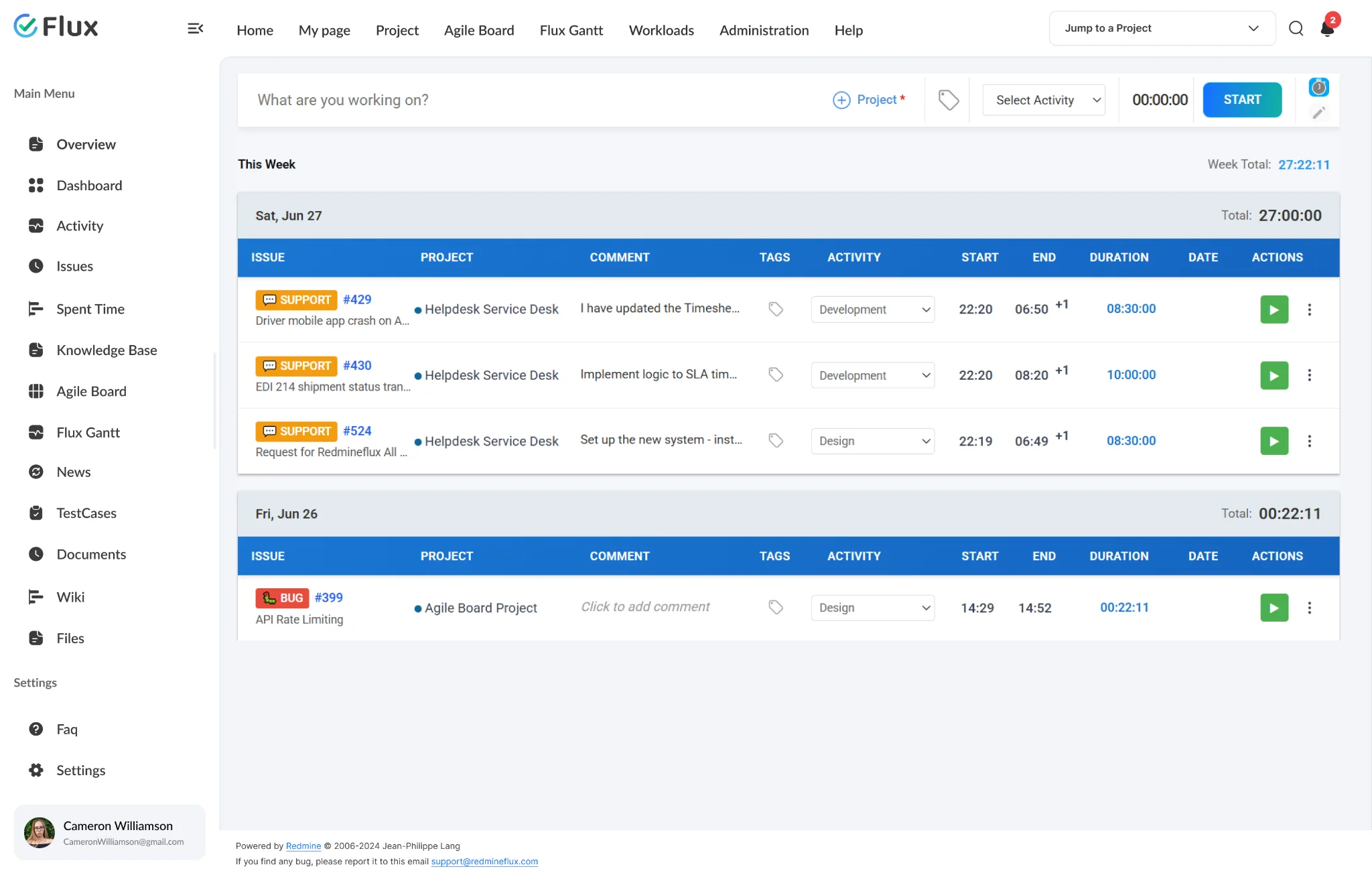
End-of-day reconstruction is inaccurate. And everyone knows it.
Accurate time tracking requires logging as work happens, not reconstructing it from memory. Developers switch contexts dozens of times per day, and opening Redmine to log each switch is impractical during focused work sessions. End-of-day reconstruction turns 30-minute tasks into one-hour estimates and the cumulative error makes project billing and resource reporting unreliable. Remote and offline work cannot be logged when Redmine requires a live connection.
Time logging as a background habit, not a separate workflow step.
The Time Tracker removes the friction between doing work and recording it. Accurate time data flows into Redmine without requiring anyone to stop, navigate, and manually enter hours after the fact. The tray icon provides one-click timer access from anywhere on the plugin without switching windows or applications.
Teams using the Timesheet Plugin for project billing get better input data when the Time Tracker is logging hours in real time rather than reconstructed at day’s end. The data that drives billing decisions reflects what actually happened.
What is the Redmineflux Time Tracker ?
The Redmineflux Time Tracker is a real time time tracking plugin that sits in the system tray and connects directly to your Redmine instance. Browse and search your assigned issues, start and stop timers with a single click, and sync logged time automatically.
Accurate time data without the logging overhead.
Pick a shift to see what changes in the product. They play on their own – hover to pause.
Accurate time data logged as work happens, not reconstructed later.
Timers start and stop at the moment of task switching. Entries reflect actual time spent rather than estimated totals. Project billing and client reporting are based on real data.
No workflow interruption – system tray access keeps logging invisible.
One-click timer access from the tray without switching windows or applications. Developers log time without interrupting the focused work session being tracked.
Offline capability with automatic sync when reconnected.
All time entries are stored locally when Redmine is unreachable. The app syncs pending entries automatically when the connection restores – no manual upload, no lost time from connectivity gaps.
Idle detection prevents inflated time entries automatically.
When the system is idle for a configurable threshold, the timer pauses and prompts the user to discard or adjust the idle period on return. Entries stay accurate without manual corrections.
Logged time is saved as standard Redmine time entries.
Every entry recorded through the Time Tracker is stored as a Redmine time entry and appears in the plugin’s Summary, Detailed, and Weekly reports. Reports can be grouped or filtered by project, user, and activity, and exported to PDF, CSV, or XML.
The specifics, for people who want them.
Log time from anywhere with real time tracking plugin.
- Start and stop a timer from any Redmine issue – no separate tool needed
- Timer stays visible while you navigate between issues and projects
- When you stop the timer, a time entry is created automatically. Depending on your Redmine settings, you may be prompted to enter a comment or fill in required custom fields before the entry is saved.
- Switch between issues without losing previously logged time
- Works entirely inside Redmine – nothing to install or configure
Find the right Redmine issue without leaving the .
- Search assigned issues by subject, ID, or project from the plugin
- Filter by project, tracker, and assignee to narrow results
- Recently tracked issues at top of list reduces search time for recurring tasks
- Full issue title and project name visible before starting a timer
Keep time entries accurate without leaving the plugin:
- Inline editing — Edit an entry’s comment, tag, activity, start time, end time, or date directly. Click the field, update the value, and press Enter to save.
- Manual time log — Add entries for work done away from the timer (calls, meetings, keyboard-free time) by entering the start time, end time, and date manually. Manual time entry must be enabled by the admin in the plugin configuration.
- Calendar view editing — Drag the start or end of an entry to extend or reduce it, double-click an entry to edit its details, or drag and drop entries to move them between dates.
What Time Tracker changes for each role.
Developer
System tray timer that logs against Redmine issues without breaking focus or switching windows.
Engineering Lead
Accurate team time data in Redmine without chasing end-of-day manual entries from every developer.
Project Manager
Reliable time-based reporting and billing data synced from real work sessions, not estimates reconstructed from memory.
IT Director
Structured time governance with offline resilience and full Redmine audit trail for every entry logged across the organisation.
Time Tracker gets better with these.
Three ways to get Time Tracker.
Time Tracker – self-hosted
- 1 year of support included
- Renew support at 30% per year
- No licence keys · unlimited users · full source
Pick the plugins you need
Add Time Tracker and the plugins it works with on the pricing page – see your one-time total, renewal and 3-year cost.
Build the stack →Redmineflux Cloud
- Time Tracker and every other plugin included
- Fixed price per team size – never per user
- Hosted, backed up and updated by us
Questions teams ask before adopting Time Tracker.
If yours isn’t here, check the pricing page or write to support@redmineflux.com.
Does the Time Tracker plugin require any separate installation?+
No. The Time Tracker installs directly into Redmine like any other Redmineflux plugin — no desktop client, no browser extension, nothing extra to configure. Once installed, the timer is available on every Redmine issue immediately.
Can multiple team members use the Time Tracker on the same Redmine instance?+
Yes. The Time Tracker is a server-side Redmine plugin, so all users on the same Redmine instance can use it by logging in with their own Redmine accounts. Each user’s time entries stay linked to their own account. For the browser extension, each user configures their own Base URL and API Key.
Does the Time Tracker plugin work with Redmine’s existing time tracking and reporting features?+
Yes. Time logged through the Time Tracker is saved as Redmine time entries and is available in the plugin’s Summary, Detailed, and Weekly reports. Reports can be grouped and filtered by project, user, and activity, and exported to PDF, CSV, or XML.
Which operating systems are supported?+
The Redmineflux Time Tracker is available for Windows (Windows 10 and later) and macOS (macOS 11 Big Sur and later). Check the product download page for the current supported OS version list and release notes before installing.
How much does the Time Tracker cost?+
Time Tracker is $299 one-time for self-hosted Redmine – 1 year of support included, then support renews at 30% of the plugin price per year. Or get every plugin hosted on Redmineflux Cloud from $69/month for up to 25 users – a fixed price, never per user.
Is there a free demo available?+
Yes – request a free demo and we’ll send a personalised demo link straight to your inbox. No credit card required, no commitment. Explore the real product at full capacity, at your own pace.
Every Redmineflux plugin
Time Tracker running inside your Redmine.
$299 one-time on self-hosted Redmine – or every plugin on Cloud from $69/month.