Redmine Notification Plugin – the right alert to the right person at the right time.
For project managers and support leads who need targeted Redmine alerts, not inbox noise.
Too many notifications. Too few that mean anything.
Redmine’s default notifications create two problems simultaneously. Teams subscribe to everything and stop reading notifications because volume is too high – critical alerts get ignored alongside routine ones. At the same time, important status changes and assignment updates get ignored alongside routine ones. At the same time, Redmine’s default notification model offers no channel flexibility – email only, regardless of whether the team checks it promptly or uses Slack and Teams for faster responses.
Notifications that work for your team, not against them.
The plugin gives administrators control over which issue events generate notifications and where they are delivered. Enable the events that matter – new issues, status changes, note additions, assignee changes, priority updates – and route them to Teams or Slack channels where responses happen faster.
Each project can have its own Teams webhook or Slack channel, so notifications reach the right team without requiring global configuration changes. Projects that generate noise – archived, test, or imported projects – can have notifications disabled entirely from project settings.
What is the Redmineflux Notification Plugin?
The Redmineflux Notification Plugin extends Redmine’s notification system with event-based controls, real-time browser notifications via Faye, a Microsoft Teams integration via incoming webhooks, and a Slack integration via Bot Token. Select which issue events generate notifications, keep notified users and watchers informed, and route issue activity to Teams or Slack channels – globally or per project.
Signal over noise, structurally enforced.
Pick a shift to see what changes in the product. They play on their own – hover to pause.
Alerts triggered only by conditions your team defines.
Select exactly which issue events generate notifications: new issues, updates, notes, status changes, assignee changes, priority updates, and target version changes. The user who performs an action does not receive a notification for their own update – only other notified users and watchers are alerted.
Right recipient, every time – notified users and watchers, not the whole team.
Notifications are delivered to the notified users and watchers set on each issue – not broadcast to the entire project. The person who made the update never receives a notification for their own change, keeping inboxes clear of self-generated noise.
Channel flexibility – deliver through the channels engineers actually monitor.
Route issue activity to Microsoft Teams via an incoming webhook and to Slack via a bot token – in addition to Redmine’s own in-app and email notifications. Each project can use its own Teams channel or Slack channel independently, so each team sees only the notifications relevant to their work.
Per-project controls – silence noise without touching global settings.
Disable notifications entirely for archived, test, or imported projects from the project settings page – without affecting any other active project. When Teams or Slack is enabled globally, each project can still use a dedicated channel or fall back to the global default. Control stays at the level that makes sense.
Real-time browser notifications keep teams informed instantly.
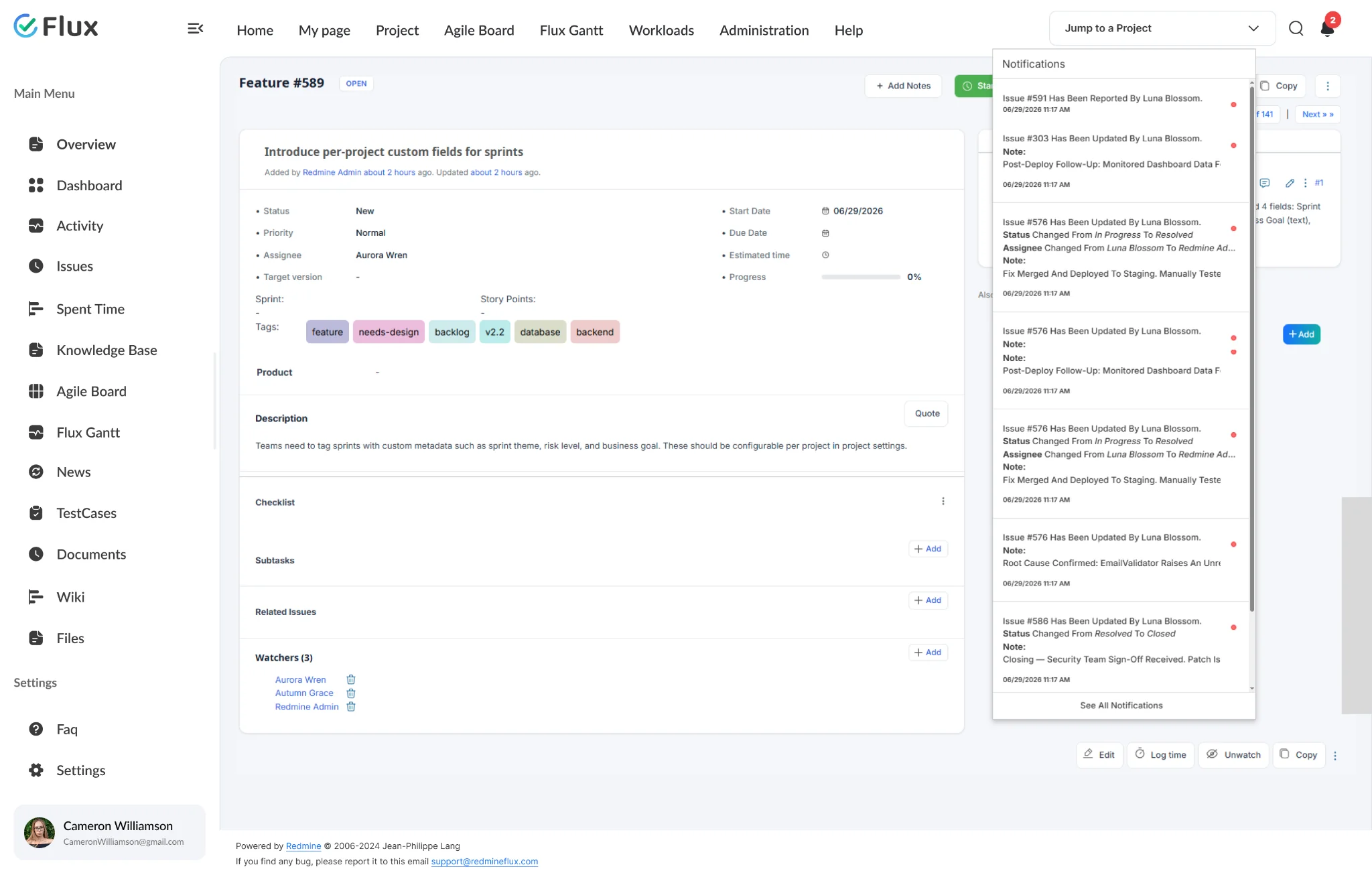
When the Faye server is configured, the notification count in the browser updates in real time – no page refresh needed. Users can also enable desktop browser notifications from their account preferences. The notification history page lets anyone review new and viewed notifications, mark all as seen, and navigate directly to the related issue.
The specifics, for people who want them.
Enable exactly which issue activity generates alerts.
- Issue added – notify when a new issue is created in the project
- Issue updated or note added – alert when content or a comment changes
- Issue status updated, assignee changed, or priority updated
- Issue target version updated – keep version-sensitive teams informed
Notified users and watchers – no broadcast, no noise.
- Notifications are delivered to the notified users and watchers set on each issue
- Users enable notifications in My Account > Preferences to start receiving alerts
- The author of an action does not receive a notification for their own update
- A red dot on the notification icon shows when new notifications have arrived
In-app, Teams, and Slack – wherever your team works.
- In-app notification icon in Redmine with real-time count update via Faye
- Microsoft Teams via incoming webhook – global or per-project channel
- Slack via Slack Bot Token and Slack Web API – global or per-project channel
- Desktop browser notifications when Faye server is running
Review, filter, and navigate from the notification history page.
- Click the notification icon and select See All Notifications to open the history page
- Filter between New Notifications and Viewed Notifications
- Mark all as seen with one click to clear the notification count
- Each notification links directly to the related issue in Redmine
Route issue activity to the channels your team already uses.
- Teams: configure a global webhook URL or a per-project webhook in project settings
- Slack: connect with a Slack Bot Token (xoxb-) and set a default or per-project channel
- Messages include issue details: project, link, author, status, priority, assignee, watchers
- Private issues and private notes are not posted to Teams or Slack
What Notification changes for each role.
Project Manager
Status change and deadline alerts routed to the right people without inbox overload – and full visibility over which rules are active.
Engineering Lead
Status change and assignee alerts delivered through Teams or Slack – the channels engineers actually monitor. Issue updates reach the right person without requiring a Redmine login to check.
Support Lead
Notifications for new issues, status changes, and assignee updates delivered to Teams or Slack. Stay informed on project activity without monitoring Redmine email constantly.
IT Director
Per-project notification controls for archived, test, and imported projects. Disable notification noise at the project level without changing global settings or affecting other active projects.
Notification gets better with these.
Three ways to get Notification.
Notification – self-hosted
- 1 year of support included
- Renew support at 30% per year
- No licence keys · unlimited users · full source
Essential bundle
Notification plus the plugins it works best with, at a published discount. Themes included.
See the bundle →Redmineflux Cloud
- Notification and every other plugin included
- Fixed price per team size – never per user
- Hosted, backed up and updated by us
Questions teams ask before adopting Notification.
If yours isn’t here, check the pricing page or write to support@redmineflux.com.
Can notifications be sent to Slack without a third-party integration service?+
Yes. The Notification Plugin integrates with Slack using the Slack Web API and a Slack Bot Token (starts with xoxb-). Administrators configure the bot token and a default Slack channel globally. Each project can then be set to use its own Slack channel, or fall back to the global default. No third-party connector or middleware is required.
Which notification events does the plugin support?+
The plugin supports seven notification events, each enabled independently: Issue added, Issue updated, Issue note added, Issue status updated, Issue assigned, Issue priority updated, and Issue target version updated. Administrators enable these from Administration > Plugins > Redmineflux Notifications plugin > Configure > Redmine Notifications.
Can notifications be delivered in real time?+
Yes. The plugin supports real-time notifications via the Faye server. Once the Faye server is running and its URL is configured in plugin settings, the notification count in the browser updates immediately when a new notification arrives – no page refresh needed. Users can also enable browser desktop notifications from My Account > Preferences.
Which Redmine versions are supported?+
The Redmineflux Notification Plugin is compatible with all Redmine versions.
How much does the Notification Plugin cost?+
Notification is $49 one-time for self-hosted Redmine – 1 year of support included, then support renews at 30% of the plugin price per year. It is also part of the Essential bundle (save 5%). Or get every plugin hosted on Redmineflux Cloud from $69/month for up to 25 users – a fixed price, never per user.
Is there a free demo available?+
Yes – request a free demo and we’ll send a personalised demo link straight to your inbox. No credit card required, no commitment. Explore the real product at full capacity, at your own pace.
Every Redmineflux plugin
Notification running inside your Redmine.
$49 one-time on self-hosted Redmine – or every plugin on Cloud from $69/month.